

Too many sources to follow
Updates may appear across CISA, NIST, sector regulators, accessibility authorities, privacy regulators and technology standards bodies.
Monitor selected technology, cybersecurity, cloud, accessibility, resilience, privacy, software, records and incident-management requirements. Rixena helps CIOs connect developments with architecture, policies, service owners and technology roadmaps.
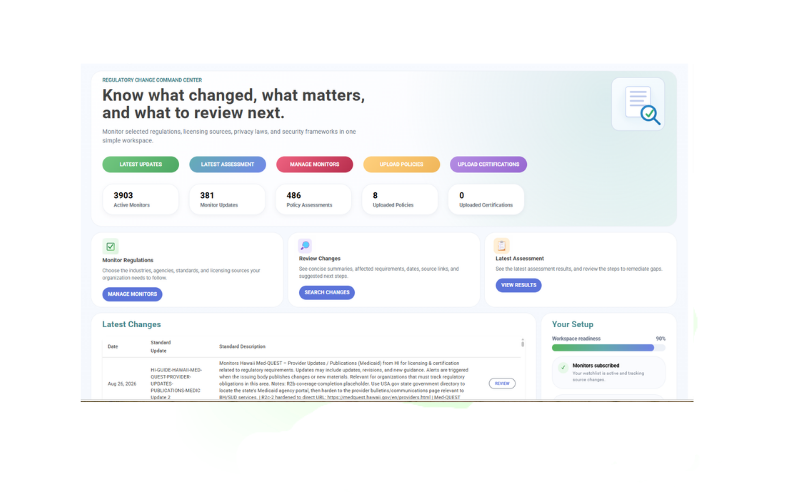
Technology leaders must interpret changes that affect infrastructure, applications, cloud providers, records, accessibility, resilience and incident processes.
Updates may appear across CISA, NIST, sector regulators, accessibility authorities, privacy regulators and technology standards bodies.
Changes can affect architecture, infrastructure, cloud services, software delivery, accessibility, records and service continuity at the same time.
Teams need a repeatable way to connect selected requirements with IT governance, cybersecurity, cloud, software development, accessibility, records and continuity policies.
Reviewers need the source, dates, affected topics, responsible owners and a documented next step.
Select the sources, jurisdictions and topics that matter to your organization. Expand or refine coverage as responsibilities change.
Selected cybersecurity laws, NIST materials, control standards and sector security guidance.
Cloud governance, provider oversight, contracting, data location and technology-service risk.
ADA-related web accessibility developments, Section 508 materials and selected technical standards.
Availability, recovery, testing, critical-service, incident and disaster-recovery expectations.
Data protection, retention, deletion, logging, records and information-lifecycle requirements.
Secure development, software supply chain, automated systems, AI and application-governance developments.
Monitor availability and applicability vary by source, jurisdiction and organization. Your team chooses the watchlist it wants Rixena to follow.
Select your monitors, receive organized change intelligence and optionally connect policies for assessment.
Choose the agencies, regulations, standards, guidance sources and jurisdictions relevant to your responsibilities.
See what changed, important dates, affected requirements, source links and suggested review areas.
Upload and assign IT governance, cybersecurity, cloud, software development, accessibility, records and continuity policies to the monitors they support.
Review potential policy gaps, ownership, next steps, remediation activity and supporting evidence.
Rixena follows the rule, bulletin, manual, guidance or licensing source your team selects.
The update is captured, summarized and organized so reviewers can focus on what changed.
Your team receives a focused review package instead of another unstructured alert.
Build watchlists by application, platform, data environment, provider, business service and jurisdiction.
Create your free monitoring accountConnect selected obligations with architecture, roadmaps and service ownership.
Identify policies, standards and technical processes that may require attention.
Route developments to security, privacy, legal, procurement and business teams.
Keep source context, decisions, actions and supporting documentation together.
Start with selected monitoring sources, then add policy assessment workflows when useful.
Talk to AllgressYes. Watchlists and assignments can be organized around selected applications, cloud services, platforms, providers, data environments and business services. Coverage depends on the monitors and sources chosen.
Yes. Regulatory monitoring and change review can be used without policy uploads. Uploading and assigning policies is optional and enables policy assessment workflows.
Yes. Teams can build watchlists around the jurisdictions, entities, locations, products, services and responsibilities that matter to the organization.
Teams may upload and assign IT governance, cybersecurity, cloud, software development, accessibility, records and continuity policies to selected monitors. When a source changes, Rixena can identify areas that may require review, clarification or remediation.
No. Rixena provides regulatory intelligence and workflow support. Your organization remains responsible for selecting sources, determining applicability and obtaining legal or professional advice where needed.
Create a free Rixena account and begin building the watchlist your organization wants to follow.